06 - Materials and textures
The Earth, textured: a color map for its albedo, a roughness map that makes the oceans glint, a normal map for relief, and city lights that glow on its night side.
Day Side |
Night Side |
|---|---|
|
|
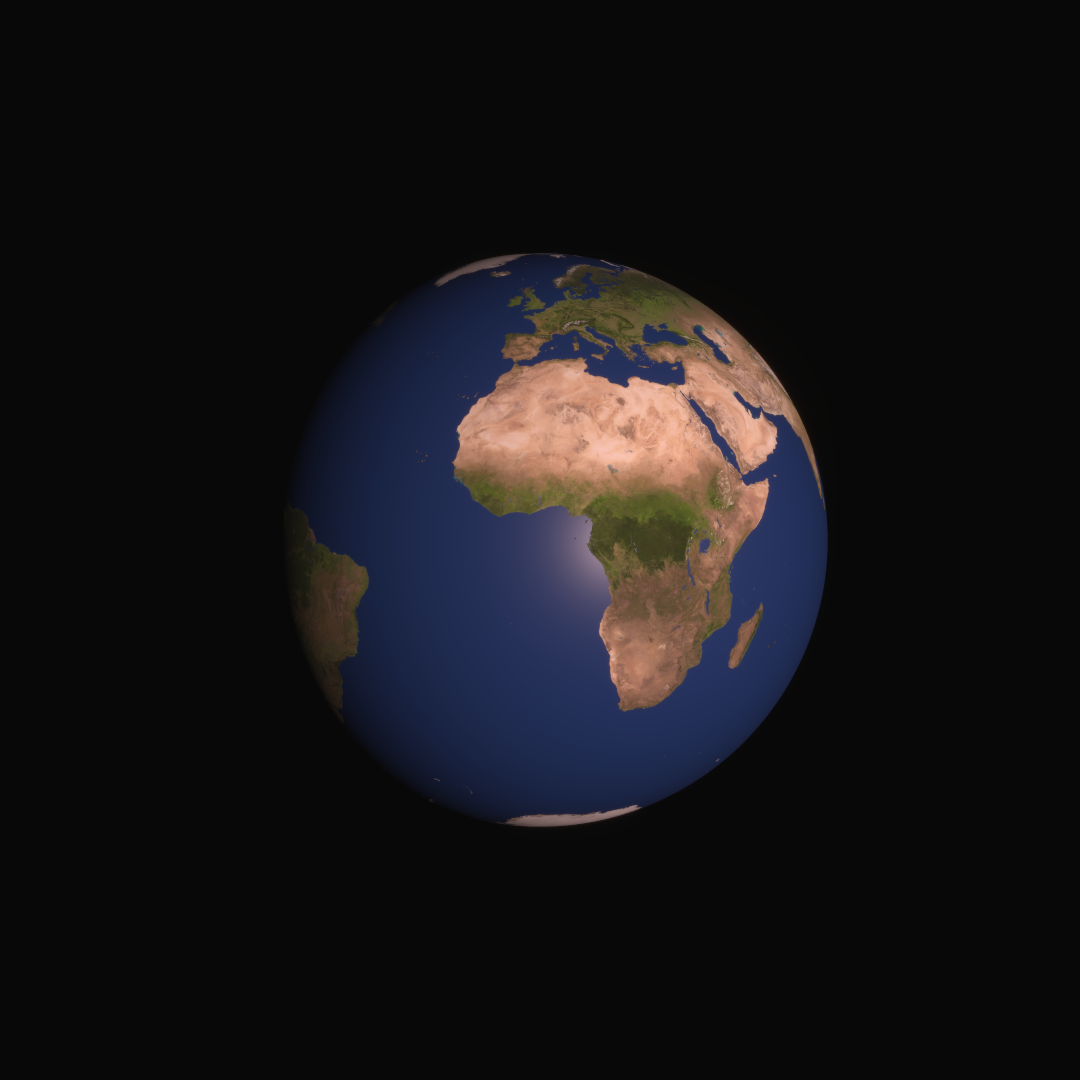
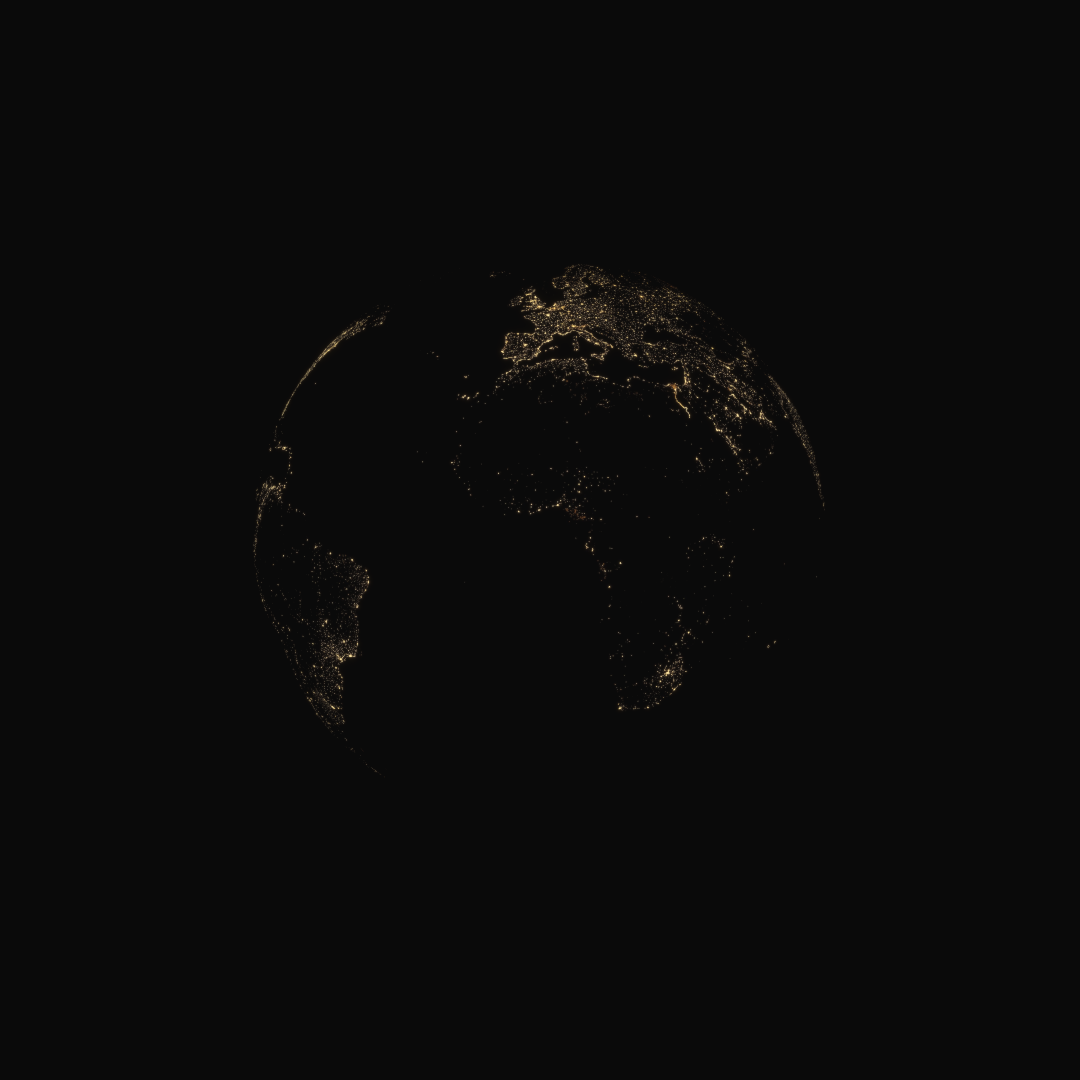
Data
File |
What it is |
From |
|---|---|---|
|
The Earth’s city lights |
|
|
The Earth’s surface by day |
|
|
The Earth’s roughness: low over water |
|
|
The Earth’s relief, as a normal map |
Download them into this folder:
curl -fLO https://media.huira.space/data/textures/solar_system/8k_earth_city_emission.jpg
curl -fLO https://media.huira.space/data/textures/solar_system/8k_earth_daymap.jpg
curl -fLO https://media.huira.space/data/textures/solar_system/8k_earth_roughness_map.tif
curl -fLO https://media.huira.space/data/textures/solar_system/8k_earth_normal_map.tif
Licenses, and how to credit the data: Earth textures.
Run
From this folder, in Python:
python materials_and_textures.py 8k_earth_daymap.jpg 8k_earth_city_emission.jpg 8k_earth_roughness_map.tif 8k_earth_normal_map.tif
or in C++, built as in Running the examples:
../../build/06_materials_and_textures 8k_earth_daymap.jpg 8k_earth_city_emission.jpg 8k_earth_roughness_map.tif 8k_earth_normal_map.tif
Each writes its images to output/, in the folder it runs from.
Source
The complete example, in both languages. View this example on GitHub.
"""
06 - Materials and textures

Demonstrates:
    - Reading images: read_image (color) and read_image_mono (one channel), from JPEG and TIFF
    - rgb_to_spectral: converting a color texture to the scene's spectral type
    - Textures: add_texture for albedo, roughness and emission, add_normal_texture for a normal
      map
    - A material's images and values: albedo, roughness, normal and emissive images, and a
      constant metalness
    - The Cook-Torrance BSDF, for surfaces with a specular highlight (here, the oceans)
    - Emission: light a surface gives off itself (here, the cities at night)
    - An ellipsoid with the Earth's equatorial and polar radii
    - srgb_to_linear: JPEG colors are sRGB-encoded, and textures must be linear.

Builds on: 05 Planetary BRDFs
Data: four of the Earth textures (see README.md)

Run:
    python materials_and_textures.py 8k_earth_daymap.jpg 8k_earth_city_emission.jpg
        8k_earth_roughness_map.tif 8k_earth_normal_map.tif

Writes:
    output/06_materials_and_textures.png         the day side
    output/06_materials_and_textures_night.png   the night side
"""

import sys
from pathlib import Path

import huira
from huira.rgb import Scene, SceneView, Renderer, SpectralBins, rgb_to_spectral

from huira.units import Meter as m
from huira.units import Kilometer as km
from huira.units import Millimeter as mm
from huira.units import Degree as deg
from huira.units import AstronomicalUnit as au
from huira.units import Microsecond as us
from huira.units import Second as sec

USAGE = (
    "Usage: python materials_and_textures.py <daymap> <citymap> <roughness_map> <normal_map>\n"
    "README.md says where to get them."
)


def main():
    if len(sys.argv) != 5:
        sys.exit(USAGE)
    daymap_path, citymap_path, roughness_path, normal_map_path = (Path(a) for a in sys.argv[1:])

    scene = Scene()

    # Cook-Torrance is a microfacet BSDF: a diffuse base with a specular lobe, shaped by the
    # material's roughness and metallic values. The Earth's roughness map is low over water, so
    # the oceans show the Sun's glint.
    cook_torrance = scene.new_bsdf_cook_torrance()
    earth_material = scene.new_material(cook_torrance)

    # Images are read into an image bundle (the image, plus any alpha channel and how it was
    # encoded). A color image is RGB; rgb_to_spectral converts it to the scene's spectral type,
    # which for huira.rgb changes nothing, and for huira.visible8 spreads it over eight bins.
    # add_texture puts the image in the scene, for materials to use.
    daymap_srgb = huira.read_image(daymap_path)
    daymap = huira.srgb_to_linear(daymap_srgb.image) # JPEG textures are in sRGB color space
    albedo_texture = scene.add_texture(rgb_to_spectral(daymap.image))
    earth_material.set_albedo_image(albedo_texture)

    # A one-channel image, for a material value that is a number at each point:
    roughness = huira.read_image_mono(roughness_path)
    roughness_texture = scene.add_texture(roughness.image)
    earth_material.set_roughness_image(roughness_texture)

    # A value without an image is set as a constant. (A factor, set_metallic_factor and the
    # like, multiplies the image or constant instead.) The Earth is not metallic, which is also
    # the default:
    earth_material.set_metallic(0)

    # A normal map tilts the surface's normal at each point, for relief that the geometry does
    # not have. add_normal_texture reads the map's colors as directions:
    normal_map = huira.read_image(normal_map_path)
    normal_texture = scene.add_normal_texture(normal_map.image)
    earth_material.set_normal_image(normal_texture)

    # Emission is light a surface gives off itself, on top of what it reflects. The city emission
    # map shows the Earth's city lights. As the emissive image, scaled by the emissive factor, it
    # gives the radiance of the brightest cities, in W/(m^2 sr) in each spectral bin of about 1e-3
    citymap_srgb = huira.read_image(citymap_path)
    citymap = huira.srgb_to_linear(citymap_srgb.image) # JPEG textures are in sRGB color space
    emissive_texture = scene.add_texture(rgb_to_spectral(citymap.image))
    earth_material.set_emissive_image(emissive_texture)
    earth_material.set_emissive_factor(SpectralBins(1.0e-3))

    # The Earth as an ellipsoid with the WGS-84 equatorial and polar radii. Textures wrap an
    # ellipsoid by longitude and latitude: longitude 0 on the +x axis, 90 degrees east on +y,
    # and north along +z.
    equatorial_radius = km(6378.137)
    polar_radius = km(6356.752)
    earth_shape = scene.add_ellipsoid(equatorial_radius, equatorial_radius, polar_radius)
    earth = scene.root.new_instance(scene.add_primitive(earth_shape, earth_material))

    # The Sun 30 degrees from the camera's direction, as seen from the Earth:
    sun = scene.root.new_instance(scene.new_sun_light())
    sun.set_position(au(0.866), au(0.5), m(0))

    # A camera 100,000 km out along +x, looking back at the Earth with north up:
    camera_model = scene.new_camera_model()
    camera_model.use_blender_convention()
    camera_model.set_focal_length(mm(25))
    camera_model.configure_sensor_from_size((1080, 1080), mm(6))
    camera_model.set_fstop(5)

    # The sensor's settings, for these exposures (example 11 covers them):
    camera_model.set_sensor_bit_depth(12)
    camera_model.set_sensor_conversion_gain(1)
    camera_model.set_sensor_quantum_efficiency(0.8)
    camera_model.set_sensor_full_well_capacity(20000)
    camera_model.enable_sensor_noise(False)

    camera = scene.root.new_instance(camera_model)
    camera.set_position(km(100000), m(0), m(0))
    camera.set_euler_angles(deg(90), deg(0), deg(90))

    renderer = Renderer()
    renderer.set_samples_per_pixel(100)
    renderer.set_max_bounces(3)
    camera_model.precompute()

    output_dir = Path("output")
    output_dir.mkdir(exist_ok=True)
    time = huira.Time("2026-01-01T00:00:00")

    def render(exposure, filename):
        scene_view = SceneView(scene, exposure, camera)
        frame_buffer = camera_model.make_frame_buffer()
        frame_buffer.enable_sensor_response()
        renderer.render(scene_view, frame_buffer)
        huira.write_png(output_dir / filename, huira.linear_to_srgb(frame_buffer.sensor_response))

    # The day side, in sunlight: a short exposure.
    render(huira.Interval.from_start(time, us(25)), "06_materials_and_textures.png")

    # The night side, move sun to far side and do a long exposure.
    sun.set_position(au(-1), au(0), m(0))
    render(huira.Interval.from_start(time, sec(2)), "06_materials_and_textures_night.png")


if __name__ == "__main__":
    main()
// 06 - Materials and textures
//
// Demonstrates:
//   - Reading images: read_image (color) and read_image_mono (one channel), from JPEG and TIFF
//   - rgb_to_spectral: converting a color texture to the scene's spectral type
//   - Textures: add_texture for albedo, roughness and emission, add_normal_texture for a normal
//     map
//   - A material's images and values: albedo, roughness, normal and emissive images, and a
//     constant metalness
//   - The Cook-Torrance BSDF, for surfaces with a specular highlight (here, the oceans)
//   - Emission: light a surface gives off itself (here, the cities at night)
//   - An ellipsoid with the Earth's equatorial and polar radii
//   - srgb_to_linear: JPEG colors are sRGB-encoded, and textures must be linear.
//
// Builds on: 05 Planetary BRDFs
// Data: four of the Earth textures (see README.md)
//
// Run:
//   ./06_materials_and_textures 8k_earth_daymap.jpg 8k_earth_city_emission.jpg
//       8k_earth_roughness_map.tif 8k_earth_normal_map.tif
//
// Writes:
//   output/06_materials_and_textures.png         the day side
//   output/06_materials_and_textures_night.png   the night side

#include <filesystem>
#include <iostream>
#include <string>
#include <utility>

#include "huira/huira.hpp"

namespace fs = std::filesystem;

using namespace huira::units::literals;

using TSpectral = huira::RGB;

int main(int argc, char** argv)
{
    if (argc != 5) {
        std::cerr << "Usage: 06_materials_and_textures <daymap> <citymap> <roughness_map> "
                     "<normal_map>\nREADME.md says where to get them.\n";
        return 1;
    }
    const fs::path daymap_path = argv[1];
    const fs::path citymap_path = argv[2];
    const fs::path roughness_path = argv[3];
    const fs::path normal_map_path = argv[4];

    huira::Scene<TSpectral> scene;

    // Cook-Torrance is a microfacet BSDF: a diffuse base with a specular lobe, shaped by the
    // material's roughness and metallic values. The Earth's roughness map is low over water, so
    // the oceans show the Sun's glint.
    auto cook_torrance = scene.new_bsdf_cook_torrance();
    auto earth_material = scene.new_material(cook_torrance);

    // Images are read into an image bundle (the image, plus any alpha channel and how it was
    // encoded). A color image is RGB; rgb_to_spectral converts it to the scene's spectral type,
    // which for huira::RGB changes nothing, and for huira::Visible8 spreads it over eight bins.
    // add_texture puts the image in the scene, for materials to use.
    auto daymap_srgb = huira::read_image(daymap_path);
    auto daymap = huira::srgb_to_linear(daymap_srgb); // JPEG textures are in sRGB color space
    auto albedo_texture = scene.add_texture(huira::rgb_to_spectral<TSpectral>(daymap.image));
    earth_material.set_albedo_image(albedo_texture);

    // A one-channel image, for a material value that is a number at each point:
    auto roughness = huira::read_image_mono(roughness_path);
    auto roughness_texture = scene.add_texture(std::move(roughness.image));
    earth_material.set_roughness_image(roughness_texture);

    // A value without an image is set as a constant. (A factor, set_metallic_factor and the
    // like, multiplies the image or constant instead.) The Earth is not metallic, which is also
    // the default:
    earth_material.set_metallic(0.f);

    // A normal map tilts the surface's normal at each point, for relief that the geometry does
    // not have. add_normal_texture reads the map's colors as directions:
    auto normal_map = huira::read_image(normal_map_path);
    auto normal_texture = scene.add_normal_texture(std::move(normal_map.image));
    earth_material.set_normal_image(normal_texture);

    // Emission is light a surface gives off itself, on top of what it reflects. The city emission
    // map shows the Earth's city lights.  As the emissive image, scaled by the emissive factor, it
    // gives the radiance of the brightest cities, in W/(m^2 sr) in each spectral bin of about 1e-3
    auto citymap_srgb = huira::read_image(citymap_path);
    auto citymap = huira::srgb_to_linear(citymap_srgb); // JPEG textures are in sRGB color space
    auto emissive_texture = scene.add_texture(huira::rgb_to_spectral<TSpectral>(citymap.image));
    earth_material.set_emissive_image(emissive_texture);
    earth_material.set_emissive_factor(TSpectral{1.0e-3f});

    // The Earth as an ellipsoid with the WGS-84 equatorial and polar radii. Textures wrap an
    // ellipsoid by longitude and latitude: longitude 0 on the +x axis, 90 degrees east on +y,
    // and north along +z.
    const auto equatorial_radius = 6378.137_Km;
    const auto polar_radius = 6356.752_Km;
    auto earth_shape = scene.add_ellipsoid(equatorial_radius, equatorial_radius, polar_radius);
    auto earth = scene.root.new_instance(scene.add_primitive(earth_shape, earth_material));

    // The Sun 30 degrees from the camera's direction, as seen from the Earth:
    auto sun = scene.root.new_instance(scene.new_sun_light());
    sun.set_position(0.866_au, 0.5_au, 0_m);

    // A camera 100,000 km out along +x, looking back at the Earth with north up:
    auto camera_model = scene.new_camera_model();
    camera_model.use_blender_convention();
    camera_model.set_focal_length(25_mm);
    camera_model.configure_sensor_from_size({1080, 1080}, 6_mm);
    camera_model.set_fstop(5);

    // The sensor's settings, for these exposures (example 11 covers them):
    camera_model.set_sensor_bit_depth(12);
    camera_model.set_sensor_conversion_gain(1.f);
    camera_model.set_sensor_quantum_efficiency(0.8);
    camera_model.set_sensor_full_well_capacity(20000.f);
    camera_model.enable_sensor_noise(false);

    auto camera = scene.root.new_instance(camera_model);
    camera.set_position(100000_Km, 0_m, 0_m);
    camera.set_euler_angles(90_deg, 0_deg, 90_deg);

    huira::Renderer<TSpectral> renderer;
    renderer.set_samples_per_pixel(100);
    renderer.set_max_bounces(3);
    camera_model.precompute();

    fs::create_directories("output");
    const huira::Time time("2026-01-01T00:00:00");

    auto render = [&](const huira::Interval& exposure, const std::string& filename) {
        huira::SceneView<TSpectral> scene_view(scene, exposure, camera);
        auto frame_buffer = camera_model.make_frame_buffer();
        frame_buffer.enable_sensor_response();
        renderer.render(scene_view, frame_buffer);
        huira::write_image_png(fs::path("output") / filename,
                               huira::linear_to_srgb(frame_buffer.sensor_response()));
    };

    // The day side, in sunlight: a short exposure.
    render(huira::Interval::from_start(time, 25_us), "06_materials_and_textures.png");

    // The night side, move sun to far side and do a long exposure.
    sun.set_position(-1_au, 0_m, 0_m);
    render(huira::Interval::from_start(time, 2_s), "06_materials_and_textures_night.png");
}