02 - Scene graph
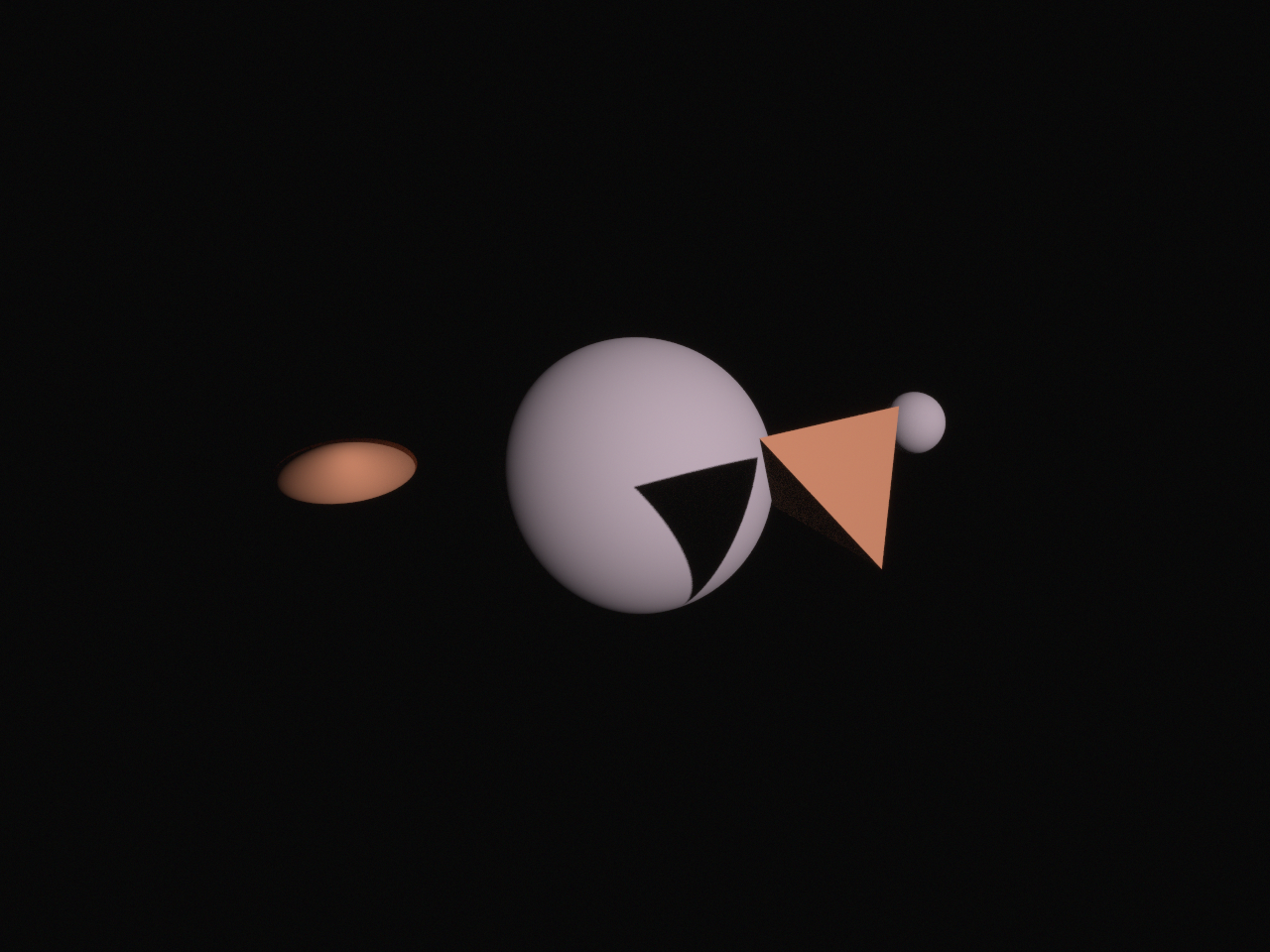
A small scene graph: assets shared between primitives and instances, frames that carry what is in them, rotations and scale, a mesh built in code, and a camera pointed with look_at.
Data
None: everything in it is built in code.
Run
From this folder, in Python:
python scene_graph.py
or in C++, built as in Running the examples:
../../build/02_scene_graph
Each writes its images to output/, in the folder it runs from.
Source
The complete example, in both languages. View this example on GitHub.
"""
02 - Scene graph

Demonstrates:
    - The asset chain: one geometry, used by two primitives with different materials
    - Building a geometry in code: a mesh from a list of vertices and a list of indices
    - Reusing one primitive in several instances, each with its own position and scale
    - Frames (new_subframe): moving or rotating a frame moves everything in it
    - Rotations: from an axis and angle (Rotation), from Euler angles, and non-uniform scale
    - Pointing a camera with look_at, which tracks its target as it moves
    - Blender's camera convention (use_blender_convention), next to the default OpenCV one
    - Naming assets, hiding an instance (set_visible), and printing the scene graph

Builds on: 01 First render
Data: none

Run:
    python scene_graph.py

Writes:
    output/02_scene_graph.png
"""

from pathlib import Path

import numpy as np

import huira
from huira.rgb import Scene, SceneView, Renderer, SpectralBins, Vertex

from huira.units import Meter as m
from huira.units import Millimeter as mm
from huira.units import Degree as deg
from huira.units import AstronomicalUnit as au
from huira.units import Microsecond as us


def main():
    scene = Scene()

    # Assets form a chain: a geometry is a shape, a primitive is a geometry with a material, and
    # an instance places a primitive in the scene. Each link can be shared. Here, one sphere
    # geometry makes two primitives, one gray and one rust-colored (albedos in red, green, blue):
    sphere = scene.add_ellipsoid(m(1), m(1), m(1), "unit_sphere")
    lambertian = scene.new_bsdf_lambertian()

    gray = scene.new_material(lambertian, "gray")
    gray.set_albedo_factor(SpectralBins(0.5))
    rust = scene.new_material(lambertian, "rust")
    rust.set_albedo_factor(SpectralBins([0.6, 0.3, 0.15]))

    gray_ball = scene.add_primitive(sphere, gray, "gray_ball")
    rust_ball = scene.add_primitive(sphere, rust, "rust_ball")

    # Frames group instances. A "planet" frame holds the planet, and a "moon_orbit" frame inside
    # it holds the moon. Rotating moon_orbit carries the moon around the planet, whatever the
    # moon's own position inside the frame:
    planet_frame = scene.root.new_subframe()
    planet_frame.set_position(m(0), m(0), m(0))

    planet = planet_frame.new_instance(gray_ball)
    planet.set_scale(2.0)

    moon_orbit = planet_frame.new_subframe()
    moon_orbit.set_rotation(huira.Rotation.from_local_to_parent(huira.Vec3(0, 0, 1), deg(40)))

    # The moon reuses the gray primitive at half the size, 5 m out along the orbit frame's x axis:
    moon = moon_orbit.new_instance(gray_ball)
    moon.set_position(m(5), m(0), m(0))
    moon.set_scale(0.5)

    # A rock: the rust primitive, scaled differently along each axis and turned by Euler angles
    # (applied in the order the sequence gives, about the x, y and z axes):
    rock = planet_frame.new_instance(rust_ball)
    rock.set_position(m(-3), m(-3), m(1))
    rock.set_scale(0.9, 0.5, 0.3)
    rock.set_euler_angles(deg(20), deg(0), deg(35), "XYZ")

    # Geometry can also be built in code, as a mesh: a list of vertices, each with a position and
    # a normal (and optionally texture coordinates and a color), and a list of indices into it,
    # three for each triangle. Here, a tetrahedron with flat faces: each face has its own three
    # vertices, which all take the face's normal.
    corners = np.array([(1, 1, 1), (1, -1, -1), (-1, 1, -1), (-1, -1, 1)], dtype=float)
    faces = [(0, 1, 2), (0, 3, 1), (0, 2, 3), (1, 3, 2)]
    vertices = []
    indices = []
    for face in faces:
        a, b, c = corners[list(face)]
        normal = np.cross(b - a, c - a)
        normal /= np.linalg.norm(normal)
        for corner in (a, b, c):
            indices.append(len(vertices))
            vertices.append(Vertex(position=huira.Vec3(*corner), normal=huira.Vec3(*normal)))
    tetrahedron_mesh = scene.add_mesh(indices, vertices, "tetrahedron")

    tetrahedron = planet_frame.new_instance(scene.add_primitive(tetrahedron_mesh, rust))
    tetrahedron.set_position(m(3), m(-3), m(1.5))
    tetrahedron.set_scale(0.7)

    # An instance can be hidden without removing it from the scene:
    hidden = planet_frame.new_instance(rust_ball)
    hidden.set_position(m(0), m(-4), m(0))
    hidden.set_visible(False)

    sun = scene.root.new_instance(scene.new_sun_light())
    sun.set_position(au(0.6), au(-0.6), au(0.5))

    # By default, Huira's cameras look along +z with +y down the image (OpenCV's convention).
    # use_blender_convention() makes them look along -z with +y up, as Blender's do, which helps
    # when comparing with Blender renders.
    camera_model = scene.new_camera_model("navcam")
    camera_model.use_blender_convention()
    camera_model.set_focal_length(mm(35))
    camera_model.configure_sensor_from_size((1280, 960), mm(36))
    camera_model.set_fstop(16)

    # look_at turns an instance to face a target, with "up" (here +z) toward the top of the
    # image. Given another instance, it keeps facing it as it moves.
    camera = scene.root.new_instance(camera_model)
    camera.set_position(m(4), m(-16), m(7))
    camera.look_at(planet, huira.Vec3(0, 0, 1))

    # Names make assets easy to find later, and to read in the printouts:
    assert scene.get_camera_model("navcam").valid()
    scene.print_graph()
    scene.print_contents()

    time = huira.Time("2026-01-01T00:00:00")
    exposure = huira.Interval.from_start(time, us(100))
    scene_view = SceneView(scene, exposure, camera)

    frame_buffer = camera_model.make_frame_buffer()
    frame_buffer.enable_sensor_response()

    renderer = Renderer()
    renderer.set_samples_per_pixel(64)
    renderer.render(scene_view, frame_buffer)

    output_dir = Path("output")
    output_dir.mkdir(exist_ok=True)
    huira.write_png(
        output_dir / "02_scene_graph.png", huira.linear_to_srgb(frame_buffer.sensor_response)
    )


if __name__ == "__main__":
    main()
// 02 - Scene graph
//
// Demonstrates:
//   - The asset chain: one geometry, used by two primitives with different materials
//   - Building a geometry in code: a mesh from a list of vertices and a list of indices
//   - Reusing one primitive in several instances, each with its own position and scale
//   - Frames (new_subframe): moving or rotating a frame moves everything in it
//   - Rotations: from an axis and angle (Rotation), from Euler angles, and non-uniform scale
//   - Pointing a camera with look_at, which tracks its target as it moves
//   - Blender's camera convention (use_blender_convention), next to the default OpenCV one
//   - Naming assets, hiding an instance (set_visible), and printing the scene graph
//
// Builds on: 01 First render
// Data: none
//
// Run:
//   ./02_scene_graph
//
// Writes:
//   output/02_scene_graph.png

#include <array>
#include <cstddef>
#include <cstdint>
#include <filesystem>
#include <iostream>

#include "huira/huira.hpp"

namespace fs = std::filesystem;

using namespace huira::units::literals;

using TSpectral = huira::RGB;

int main()
{
    huira::Scene<TSpectral> scene;

    // Assets form a chain: a geometry is a shape, a primitive is a geometry with a material, and
    // an instance places a primitive in the scene. Each link can be shared. Here, one sphere
    // geometry makes two primitives, one gray and one rust-colored (albedos in red, green, blue):
    auto sphere = scene.add_ellipsoid(1_m, 1_m, 1_m, "unit_sphere");
    auto lambertian = scene.new_bsdf_lambertian();

    auto gray = scene.new_material(lambertian, "gray");
    gray.set_albedo_factor(TSpectral{0.5f});
    auto rust = scene.new_material(lambertian, "rust");
    rust.set_albedo_factor(TSpectral{0.6f, 0.3f, 0.15f});

    auto gray_ball = scene.add_primitive(sphere, gray, "gray_ball");
    auto rust_ball = scene.add_primitive(sphere, rust, "rust_ball");

    // Frames group instances. A "planet" frame holds the planet, and a "moon_orbit" frame inside
    // it holds the moon. Rotating moon_orbit carries the moon around the planet, whatever the
    // moon's own position inside the frame:
    auto planet_frame = scene.root.new_subframe();
    planet_frame.set_position(0_m, 0_m, 0_m);

    auto planet = planet_frame.new_instance(gray_ball);
    planet.set_scale(2.0);

    auto moon_orbit = planet_frame.new_subframe();
    moon_orbit.set_rotation(
        huira::Rotation<double>::from_local_to_parent(huira::Vec3<double>{0.0, 0.0, 1.0}, 40_deg));

    // The moon reuses the gray primitive at half the size, 5 m out along the orbit frame's x axis:
    auto moon = moon_orbit.new_instance(gray_ball);
    moon.set_position(5_m, 0_m, 0_m);
    moon.set_scale(0.5);

    // A rock: the rust primitive, scaled differently along each axis and turned by Euler angles
    // (applied in the order the sequence gives, about the x, y and z axes):
    auto rock = planet_frame.new_instance(rust_ball);
    rock.set_position(-3_m, -3_m, 1_m);
    rock.set_scale(0.9, 0.5, 0.3);
    rock.set_euler_angles(20_deg, 0_deg, 35_deg, "XYZ");

    // Geometry can also be built in code, as a mesh: a list of vertices, each with a position and
    // a normal (and optionally texture coordinates and a color), and a list of indices into it,
    // three for each triangle. Here, a tetrahedron with flat faces: each face has its own three
    // vertices, which all take the face's normal.
    const std::array<huira::Vec3<float>, 4> corners = {{
        {1.f, 1.f, 1.f},
        {1.f, -1.f, -1.f},
        {-1.f, 1.f, -1.f},
        {-1.f, -1.f, 1.f},
    }};
    const std::array<std::array<std::size_t, 3>, 4> faces = {{
        {0, 1, 2},
        {0, 3, 1},
        {0, 2, 3},
        {1, 3, 2},
    }};
    huira::VertexBuffer<TSpectral> vertices;
    huira::IndexBuffer indices;
    for (const auto& face : faces) {
        const huira::Vec3<float>& a = corners[face[0]];
        const huira::Vec3<float>& b = corners[face[1]];
        const huira::Vec3<float>& c = corners[face[2]];
        const huira::Vec3<float> normal = glm::normalize(glm::cross(b - a, c - a));
        for (const huira::Vec3<float>& corner : {a, b, c}) {
            indices.push_back(static_cast<std::uint32_t>(vertices.size()));
            huira::Vertex<TSpectral> vertex;
            vertex.position = corner;
            vertex.normal = normal;
            vertices.push_back(vertex);
        }
    }
    auto tetrahedron_mesh = scene.add_mesh(indices, vertices, "tetrahedron");

    auto tetrahedron = planet_frame.new_instance(scene.add_primitive(tetrahedron_mesh, rust));
    tetrahedron.set_position(3_m, -3_m, 1.5_m);
    tetrahedron.set_scale(0.7);

    // An instance can be hidden without removing it from the scene:
    auto hidden = planet_frame.new_instance(rust_ball);
    hidden.set_position(0_m, -4_m, 0_m);
    hidden.set_visible(false);

    auto sun = scene.root.new_instance(scene.new_sun_light());
    sun.set_position(0.6_au, -0.6_au, 0.5_au);

    // By default, Huira's cameras look along +z with +y down the image (OpenCV's convention).
    // use_blender_convention() makes them look along -z with +y up, as Blender's do, which helps
    // when comparing with Blender renders.
    auto camera_model = scene.new_camera_model("navcam");
    camera_model.use_blender_convention();
    camera_model.set_focal_length(35_mm);
    camera_model.configure_sensor_from_size({1280, 960}, 36_mm);
    camera_model.set_fstop(16);

    // look_at turns an instance to face a target, with "up" (here +z) toward the top of the
    // image. Given another instance, it keeps facing it as it moves.
    auto camera = scene.root.new_instance(camera_model);
    camera.set_position(4_m, -16_m, 7_m);
    camera.look_at(planet, huira::Vec3<double>{0.0, 0.0, 1.0});

    // Names make assets easy to find later, and to read in the printouts:
    if (!scene.get_camera_model("navcam").valid()) {
        std::cerr << "navcam not found\n";
        return 1;
    }
    scene.print_graph();
    scene.print_contents();

    huira::Time time("2026-01-01T00:00:00");
    huira::Interval exposure = huira::Interval::from_start(time, 100_us);
    huira::SceneView<TSpectral> scene_view(scene, exposure, camera);

    auto frame_buffer = camera_model.make_frame_buffer();
    frame_buffer.enable_sensor_response();

    huira::Renderer<TSpectral> renderer;
    renderer.set_samples_per_pixel(64);
    renderer.render(scene_view, frame_buffer);

    fs::create_directories("output");
    huira::write_image_png("output/02_scene_graph.png",
                           huira::linear_to_srgb(frame_buffer.sensor_response()));
}